

The Glow Labs research team has identified AI coding agents independently deciding to install deprecated MCP servers, potentially exposing these organizations to high-severity flaws in servers that no longer receive security updates.
Glow Labs calls this pattern MCPhantom: retired servers that keep turning up on developer machines.
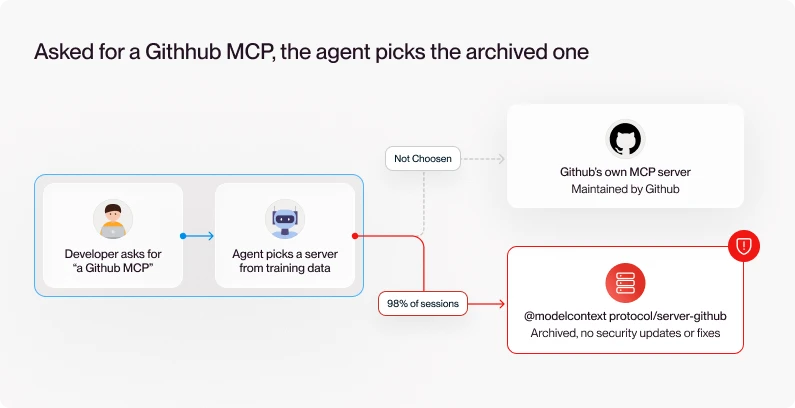
In 98% of the sessions observed by researchers, the developer asked their agents for a capability, such as "a GitHub MCP," and the agent chose the package it wanted to use itself.
In the GitHub example, instead of the official MCP server that GitHub maintains, the agent chose a deprecated Anthropic server that it remembered from its training data instead of looking for the most up to date and secure version.
That server's repository is archived, and its archive notice says no security updates or bug fixes will be provided.
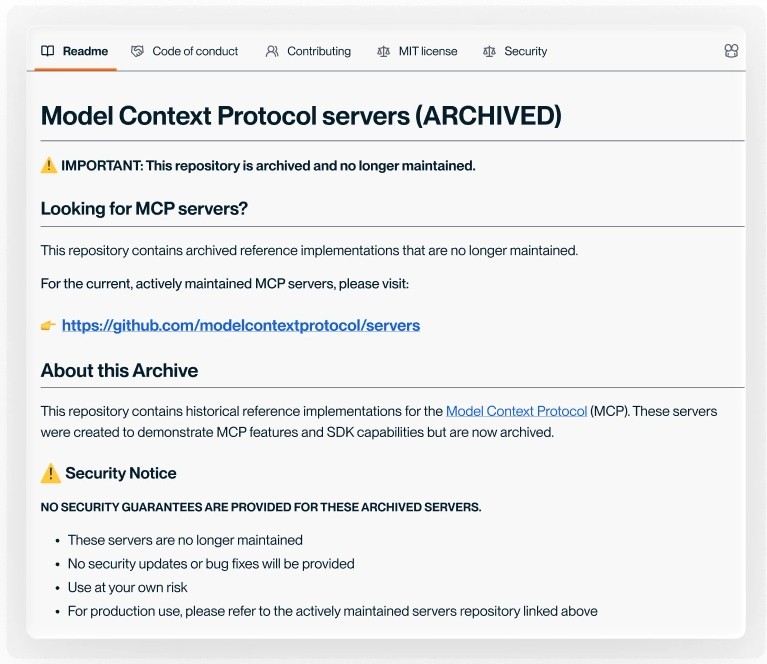
For security teams, that's less than ideal, to put it mildly, because software is landing on developer machines based on an agent's training data, with little to signal that it's no longer maintained.
Meanwhile, agents are not going to pay much attention to the archived notices so even when they are clearly marked, the risk remains.
What did Glow Labs find?
Glow Labs reviewed real-world AI coding session transcripts and found sessions in which an agent set up deprecated Anthropic MCP servers.

The first question was who chose those packages. In almost every case, it was the agent. Developers asked for a capability, and the agent filled in the rest:
- A developer asks the agent to connect a service, such as GitHub.
- The agent fills in the name of an early reference server from its training data.
- It either writes the MCP config itself or hands the developer the command, and then npm installs the deprecated package.
The same pattern showed up in every tool and with every model provider in the data, so no single vendor's fix would close the gap:
- Agent harnesses: Claude Code, Cursor, Codex CLI, Claude Cowork, and Claude chat
- Model providers: Anthropic, OpenAI, and xAI
Finally, the team looked at what the agents had actually installed, and that's where the findings get more serious:
- Four high-severity vulnerabilities across the original deprecated servers created by Anthropic when they launched MCP
- Still widely used, with 1,654,660 npm downloads a month across Anthropic's deprecated reference servers, five of them in npm's top MCP 100 and there's no indication that they will ever be fixed or updated
What should security teams do now?
Security teams can take these steps with the tools they already have:
- Find and replace the deprecated servers. Search developer machines for MCP configs that reference the deprecated @modelcontextprotocol servers, and switch to the service owner's own MCP server where one exists.
- Approve one server per service. Pick a single option for each service and make it the standard.
- Check deprecation before approval. Add npm deprecation status to the criteria for approving any MCP server.
Why do agents keep choosing deprecated servers?
None of these sessions involved a malicious actor. Instead, the risk came from the agent's own choice of package, based on what it learned during training.
A fast-growing ecosystem leaves old servers behind
The AI tooling ecosystem is growing quickly, and that growth means a lot of turnover. An independent census of the official MCP registry by researcher Haseeb Mohammed Afsar counted about 195 new servers a day, and GitHub's Octoverse 2025 report counted 4.3 million AI-related repositories.
The history of MCP itself is a good example. When Anthropic introduced it in 2024, it published 20 reference servers to show developers how to build integrations.
As most of the services built servers of their own, 13 of those reference servers were archived, which is a normal part of a maturing ecosystem.
Once GitHub and the other services shipped their own servers, there was little reason for Anthropic to keep maintaining duplicates.
These Agents worked from training data, so finding the current package is not on the agenda
A model learns which package name to use when it wants an MCP server for GitHub. Whether that name has since been deprecated isn't part of its training.
Deprecation on npm doesn't close the gap either. A deprecated package disappears from npm search , which may explain why most web searches came up empty, but npx will still install it with nothing more than a warning.
Why existing controls weren't built to catch deprecated MCP servers
Simply put, these MCP servers are dependencies that never show up in a dependency file, so the tools built to watch dependencies don't see them.
That leaves the endpoint, where the agent writes the config and runs the install, as the one place this issue shows up.
What should Glow customers do?
Glow customers can find every deprecated MCP server on their developer machines with one request. Glowy, Glow's AI platform agent, works from an inventory of the agent plugins and MCP servers on each managed developer machine, across more than 20 AI tools.
Here's how a security engineer would use it:
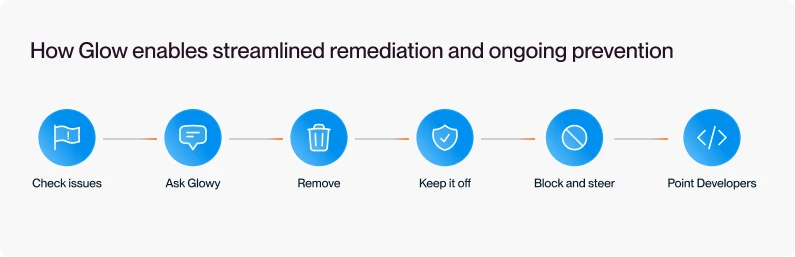
- Check your issues. Glow's discovery and Glow Labs research have already flagged any deprecated MCP servers with known vulnerabilities on your endpoints, so any MCPhantoms on your endpoints are already waiting in your issues.
- Ask. "Which endpoints have a deprecated @modelcontextprotocol server configured?" Glowy returns the endpoints, the servers, and their versions.
- Remove. After the engineer approves, Glowy deletes the MCP server's config entry on each endpoint.
- Keep it off the fleet. Set a policy based on npm deprecation status, and Glow flags every deprecated server on every endpoint at the next scan, including new installs.
- Block and steer the agent. When an agent tries to use a deprecated server, Glow blocks the call and steers the agent toward the approved server instead.
- Point developers to the replacement. Glowy can email affected developers, message them on Slack, or open a Jira or ServiceNow ticket.
Glow can also block calls to risky MCP servers with a policy, so agents can't use them even after they're installed.
Which package will your agents reach for next?
AI tools will keep changing faster than any team can track by hand, and packages will keep getting retired after the models that recommend them were trained.
"The model's memory is now a package manager with no deprecation feed," said Ophir Arie, Glow co-founder and VP of R&D, "And this means that we're going to have to change our approach to how we think about risk in our AI environments to one that views the agent's decision-making process as suspect and in need of controls."









.svg)
.svg)
.svg)
