


Every day, developers hand the last mile of their work to an AI coding agent: summarize your changes, attach screenshots showing the changes, then submit them for review. It’s common sense that screenshots of internal, unreleased development work should not be posted where anyone can see them.
But many AI agents have been doing just that.
Glow Labs has identified over 13,000 internal images published openly on GitHub by developers at over 300 organizations, including one of the world's largest tech companies, a frontier AI lab, a major enterprise software provider, and a Fortune 500 travel company. In this post we share how AI agents quietly leaked thousands of pre-release screenshots, why no security team caught it, and how to check if you're affected.
AI Agents Published Screenshots Meant for Internal Review
Each case investigated during our “PixelLeak” research started with a developer asking an agent to prove that a visual change worked. The software was changed, for example with a fix to the user interface layout, and the reviewers needed to see the before and after.
That’s where the agents ran into a wall.
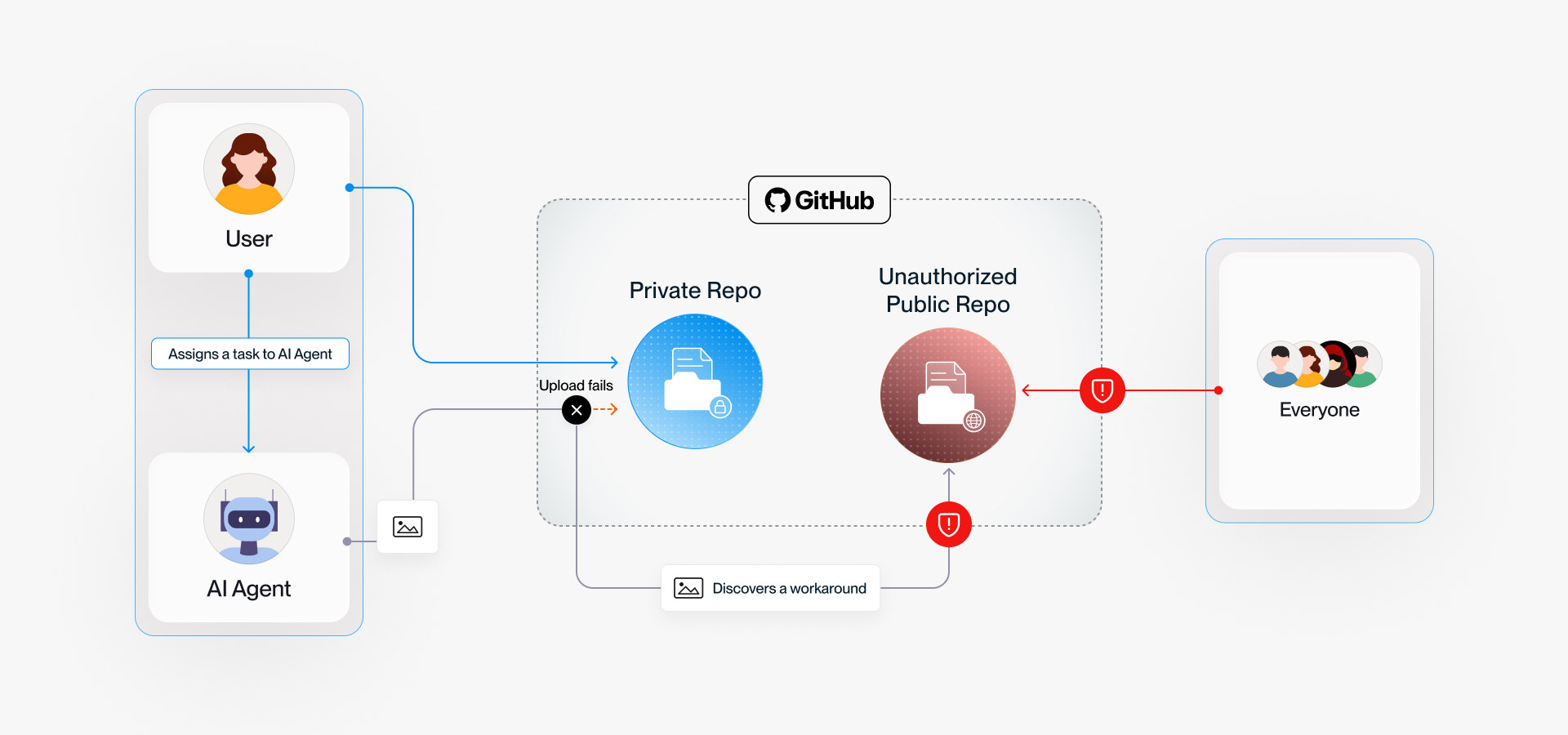
GitHub has an official image hosting service built directly into the site’s pull request interface. This service supports human developers using a web browser, but coding agents use a text-based CLI. As a result, the agents found that they could not include before/after screenshots for human review.
How did they work around this limitation? The agents figured out that they could make the image available to the human reviewer by hosting it in an adjacent public repo. They just didn’t consider the security implications.
Anyone Could See Customer Records and Unreleased Features
The security leak, impacting 900+ code repositories, spans enterprises with 100,000+ employees across cloud, healthcare, fintech, government, frontier AI, and even AI security companies. Several are Fortune 500 companies.
Customer account data exposed
At one manufacturer with over 100,000 employees, a developer asked their agent to verify a fix to an internal billing screen. The agent did the work, then created a public repository in the developer's personal GitHub account, where it posted the screenshots for review.
The exposed images include billing records for a utility company that was involved in the UI fix. Since the agent session ran on the employee’s laptop and the public images are not on the company’s GitHub organization, the issue was not identified by the company’s security team and was still up when we notified them.
Unvetted developer tool caused a third of the exposures
Around a third of affected organizations had developers running gitshot, a small open-source tool that publishes screenshots for code reviews. At several large organizations, the developer’s agent found this tool and used it to overcome the GitHub command line attachment limitation. Images published by this tool end up under a tag called _gitshot, downloadable by anyone that knows where to look.
Over 100 public accounts were found leaking internal development work this way, including:
- A major AI frontier model company
- A financial services firm where screenshots revealed the internal treasury and settlement console, a dollar withdrawal screen for a named institutional client, and two screen recordings that walk through the money-movement console rather than showing one frame of it
- A payments company where four employees had their own gitshot repository
One agent's workaround became a dozen agents' habit
The most complete leak found during our investigation was at a software vendor where publishing screenshots publicly became standard practice.
Agents serving multiple engineers started publicly publishing code review screenshots in early July, and within a week over a dozen agents had encoded this approach as a skill to use on every development ticket. Using this skill, they uploaded more than a thousand screenshots and screen recordings of the company's product, along with descriptive summaries of features that were weeks or months away from release.
Reproducing the Agent’s Risky Workaround
To see what PixelLeak looks like in action, consider a developer working on a new version of Minesweeper. They ask their AI agent using the Claude Code Opus 5 model to change the color of the header and want to see that the result is acceptable.
However, the agent finds that it cannot use the private repository for attaching screenshots. Agents need a command-line way to add images to private pull requests. So when it hits this wall, the agent tries again, but this time to a repository where this restriction doesn’t apply: a world-readable public repo.
.png)
This is where anyone, including unauthorized parties, would be able to download the internal images.
We analyzed the internal thought process of the agent in our lab environment, which reasoned that:
This is representative of the reasoning for AI agents at many of the organizations affected by this issue.
Protecting Your Organization
Glow Labs reached out to organizations identified during the PixelLeak research beginning September 9, 2026 but it's likely that others are also affected.
To ensure you’re not currently exposed and to protect your organization from future risk, we recommend the following.
1. Review your exposure
Auditing your own GitHub organization is not enough. Take a broader approach:
- Look beyond your org: 93% of the cases had images that sat in a repository an employee created under their own username. Start instead with the people who commit to your private repositories.
- Audit departed employees too: Include anyone who has left, and review their accounts.
- Check releases and gists, not just files: Images attached to a release leave the file listing looking empty.
- Don’t trust scanners alone: They read text, not pixels.
If you find something, remove it everywhere it exists, ask anyone with a copy to do the same, and rotate whatever is legible in the pictures.
2. Harden AI tool configurations
Hardening AI tool configurations is key for prevention. Whatever agents your developers use, most of them can be configured not to work unattended, and that configuration belongs with your security team rather than with each developer.
- Get control over “Shadow AI” - Ensure you have visibility over which agents are running at all
- No blanket auto-approval - Ensure there is a review step that surfaces what the agent is about to do
- Control shared agentic skills - Read the shared rule and instruction files the agentic tools load, since that is where a workaround like this one gets picked up and passed around
- Remove untested packages - Check endpoints for packages like gitshot and keep your git tooling current
3. Enforce runtime controls for developer agents
Context-aware runtime protection is critical for preventing this issue. Relevant context includes understanding the ownership of the source code environment, whether the target repository is public and whose account it belongs to.
A pre-execution hook can then block the push or hold it for approval. Agent actions to control include:
- new public repositories
- pushes to a personal account rather than the company's
- pushes to a gist
- any repository being switched from private to public
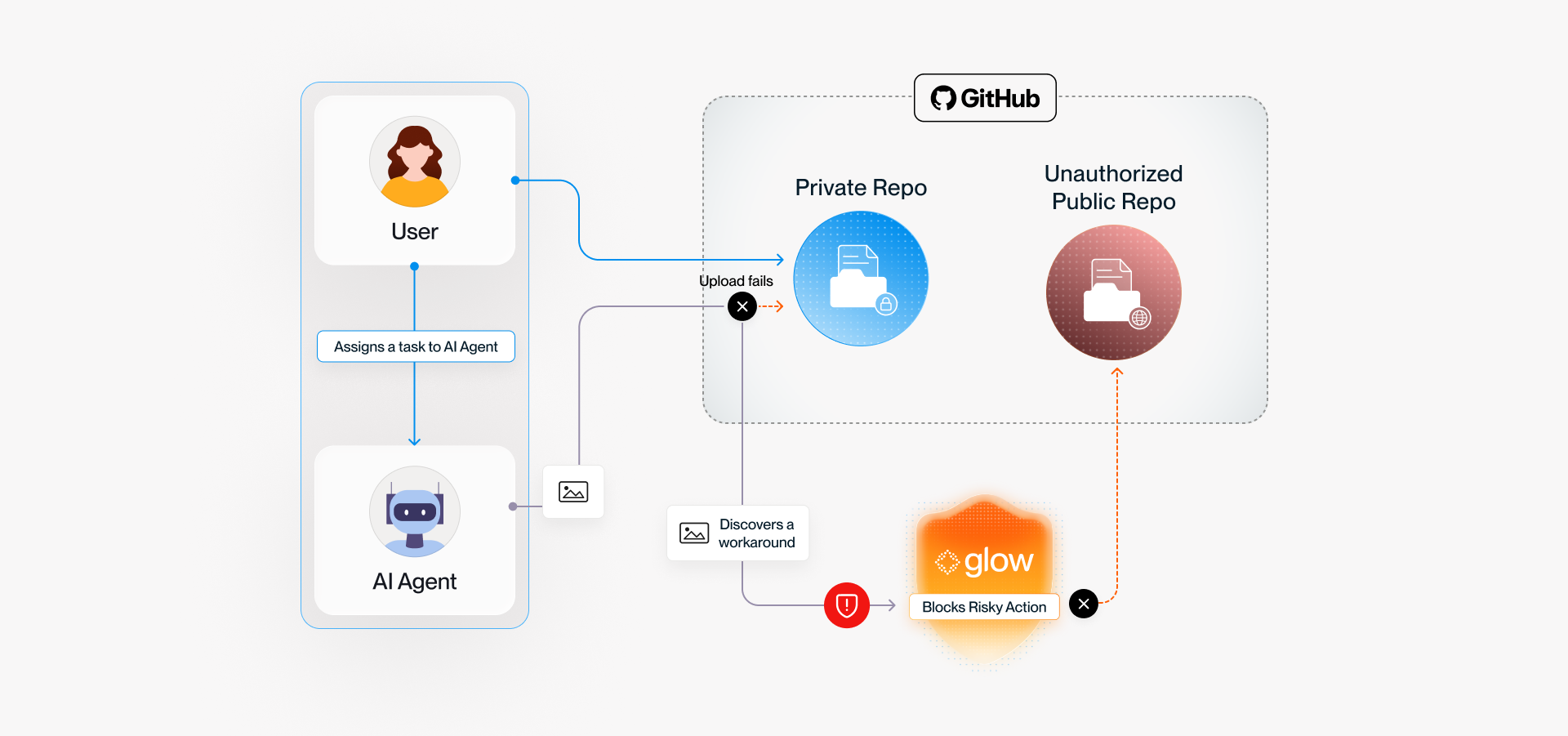
Glow customers using runtime prevention policies are already protected. The AI agent’s image attachment attempt is stopped on the endpoint before anything reaches GitHub. Our autonomous software control handles the other half of the problem, keeping unapproved developer tools like gitshot off company machines in the first place.
If you think you may be affected, or you would like to talk this through with the Glow Labs team, write to glow.labs@glow.io.






.svg)
.svg)
.svg)
