

Terminology around AI risk moves as fast as AI itself, and new terms arrive faster than shared, clear definitions of the challenges we are trying to describe. For security teams, that makes it harder to assess their risk and take concrete steps to reduce it.
Shadow AI is probably one of the top examples that we believe is woefully overused and poorly defined.
Most of the industry defines Shadow AI as the use of AI tools that IT hasn't approved.
It comes from the legacy Shadow IT term that referred to software that was used by employees but not officially sanctioned or installed by the organization.
We believe that this definition of Shadow AI is too narrow, because it misses many of the ways employees use AI outside their organization's controls.
At the same time, the term shouldn't become a catch-all for every AI risk a security team faces.
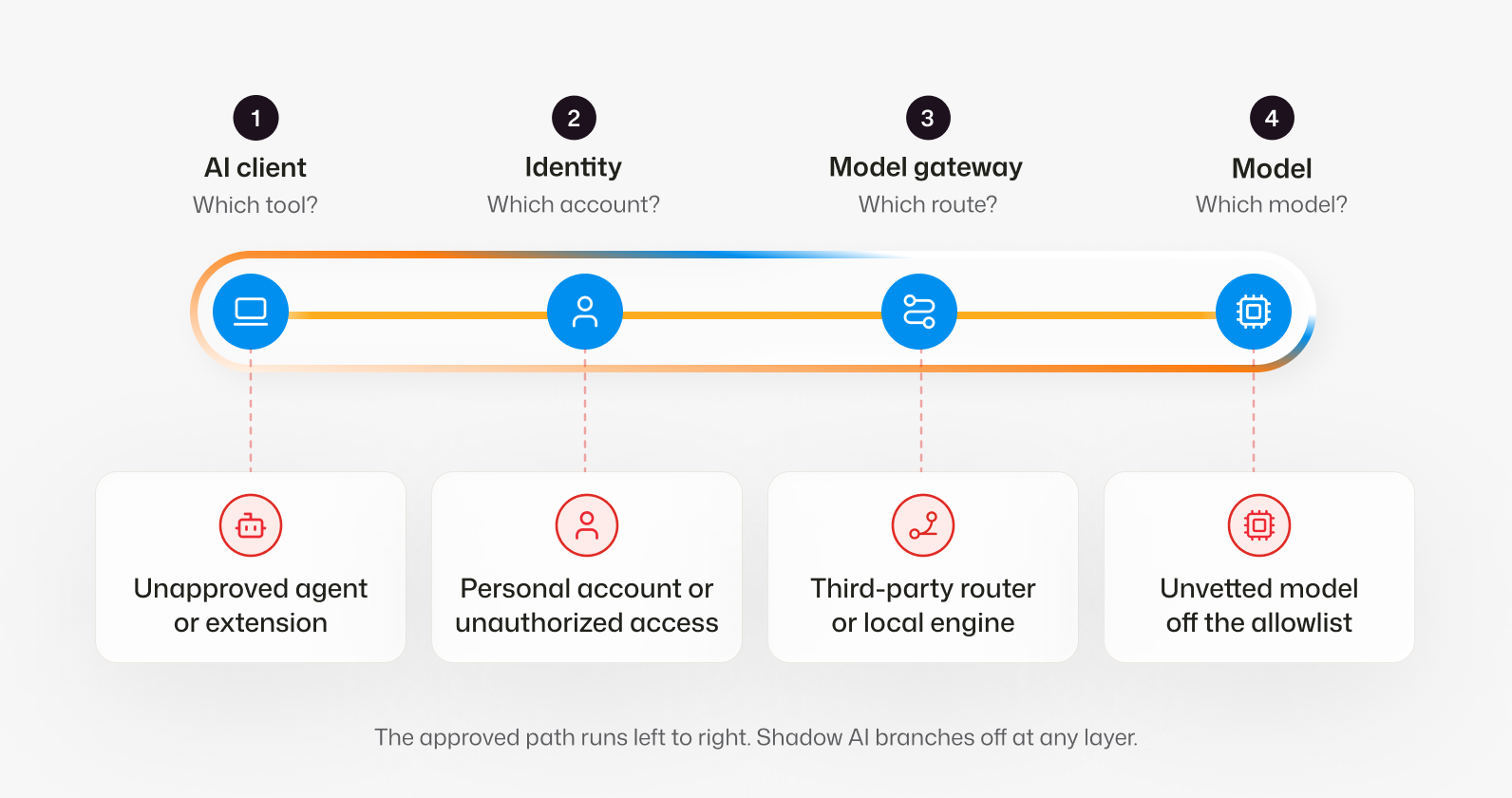
At Glow, we define Shadow AI as any AI used outside the company's approved path, covering everything from the AI client to the model.
The approved path is what a company has sanctioned at each step:
- The AI tools employees can use
- The accounts they use them with
- How the traffic is routed
- Which models it can reach
We built this definition from findings across our research into enterprise AI use and industry movements.
According to our research, unapproved AI agents appeared in 88% of the organizations we analyzed, which is the part most existing definitions already cover.
Many of our other findings involved tools the company had already approved. Employees were using them through personal accounts or sending their traffic around the company's LLM gateway, sometimes to models the company never vetted.
Each of these findings gets around a different control, which is why we look at Shadow AI one layer at a time.
The four layers of the Shadow AI path
Each step of the approved path is a layer where AI use can go off course. The table below shows the question each layer answers about how AI is being used, and Shadow AI starts wherever the answer falls outside your policy.
AI client: which tool?
The first layer is the AI client, the tool an employee uses to work with AI. It can take many forms, from a desktop application or IDE plugin to a package like OpenClaw or Hermes, or even a temporary cloud instance.
The control at stake is the company's list of approved software, which can differ from one business unit to another. An unapproved client sends company data and actions through a tool the security team never vetted.
We found the Hermes agent on one endpoint where Claude Code was also running on a personal paid plan, putting that endpoint off the path at two layers.
Identity: which account?
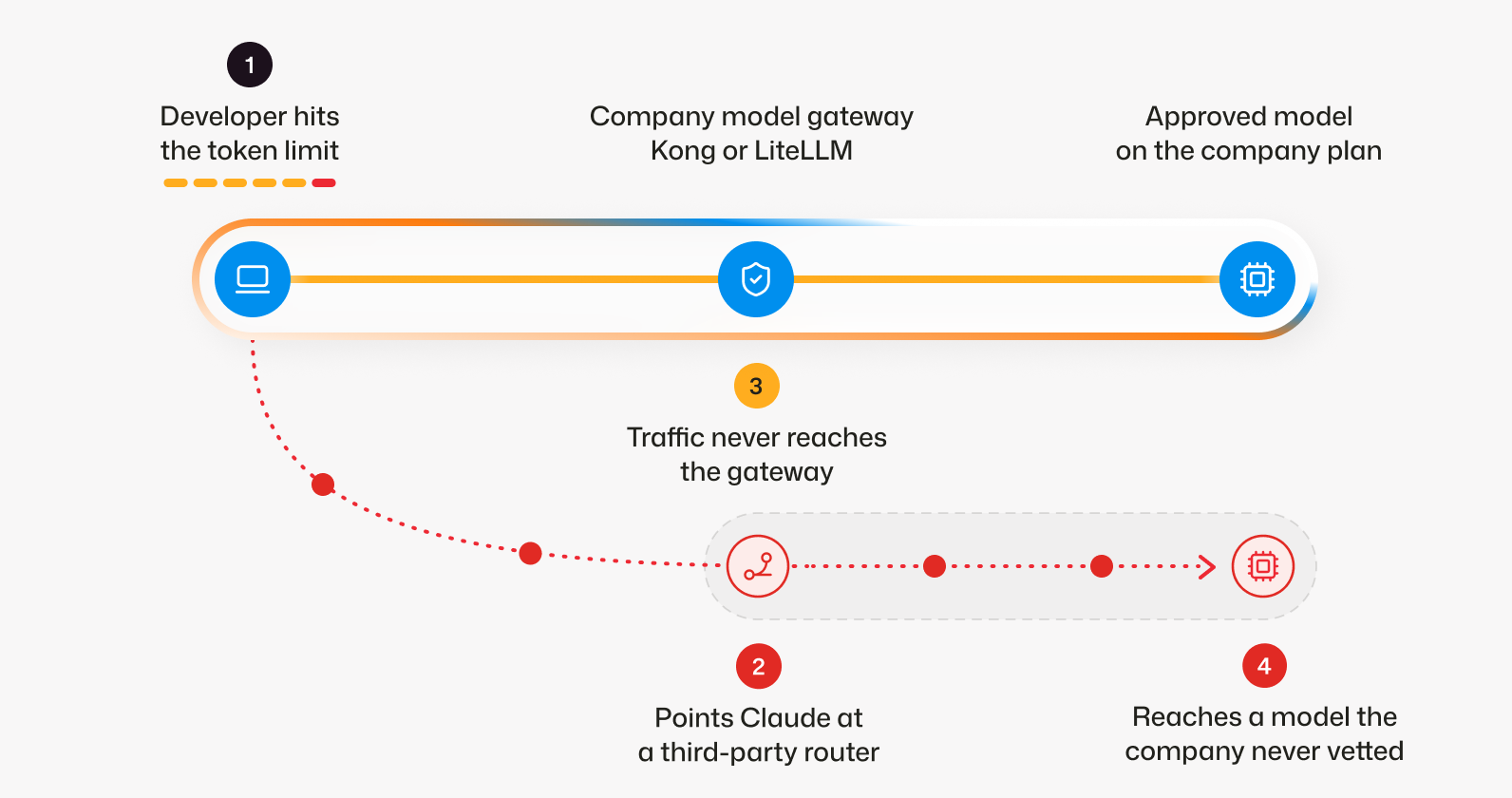
The second layer is the identity behind the AI. A developer who hits the usage limit on the company's Claude Code plan may switch to a personal account to finish the task.
That moves the work outside the corporate license and SSO, and outside the policies the company set for its own accounts. Our research found personal AI use in 87% of the organizations we analyzed.
Identity also covers who may use a tool and for what. In one case we saw, a company had approved Claude for developers only, so Claude on a sales laptop counted as Shadow AI. In another, an employee built a Copilot Studio agent that checked a movie site every day to book tickets.
Model gateway: which route?
The third layer is the route AI traffic takes to reach a model. Many organizations manage their flow through an LLM gateway such as Kong or LiteLLM, but a gateway only governs the traffic that reaches it.
When a developer points Claude at a third-party router like OpenRouter, or runs a local inference engine like Ollama, the traffic skips the gateway. The company loses visibility into that usage, and it no longer counts against the company's own plan.
In 13% of the organizations we analyzed, at least one endpoint routed traffic this way.
One security team didn't know its developers were routing AI traffic through OpenRouter until we surfaced it.
Model: which model?
The fourth layer is the model itself. Once traffic leaves the approved route, it can reach models the company never vetted.
The control here is the company's model allowlist. A model with fewer guardrails can make an agent more likely to act unpredictably or run destructive commands, even when every other layer is approved.
Elsewhere, Claude traffic was routed through OpenRouter to a DeepSeek model, rather than to the Anthropic models the company was paying for.
What Shadow AI doesn't cover
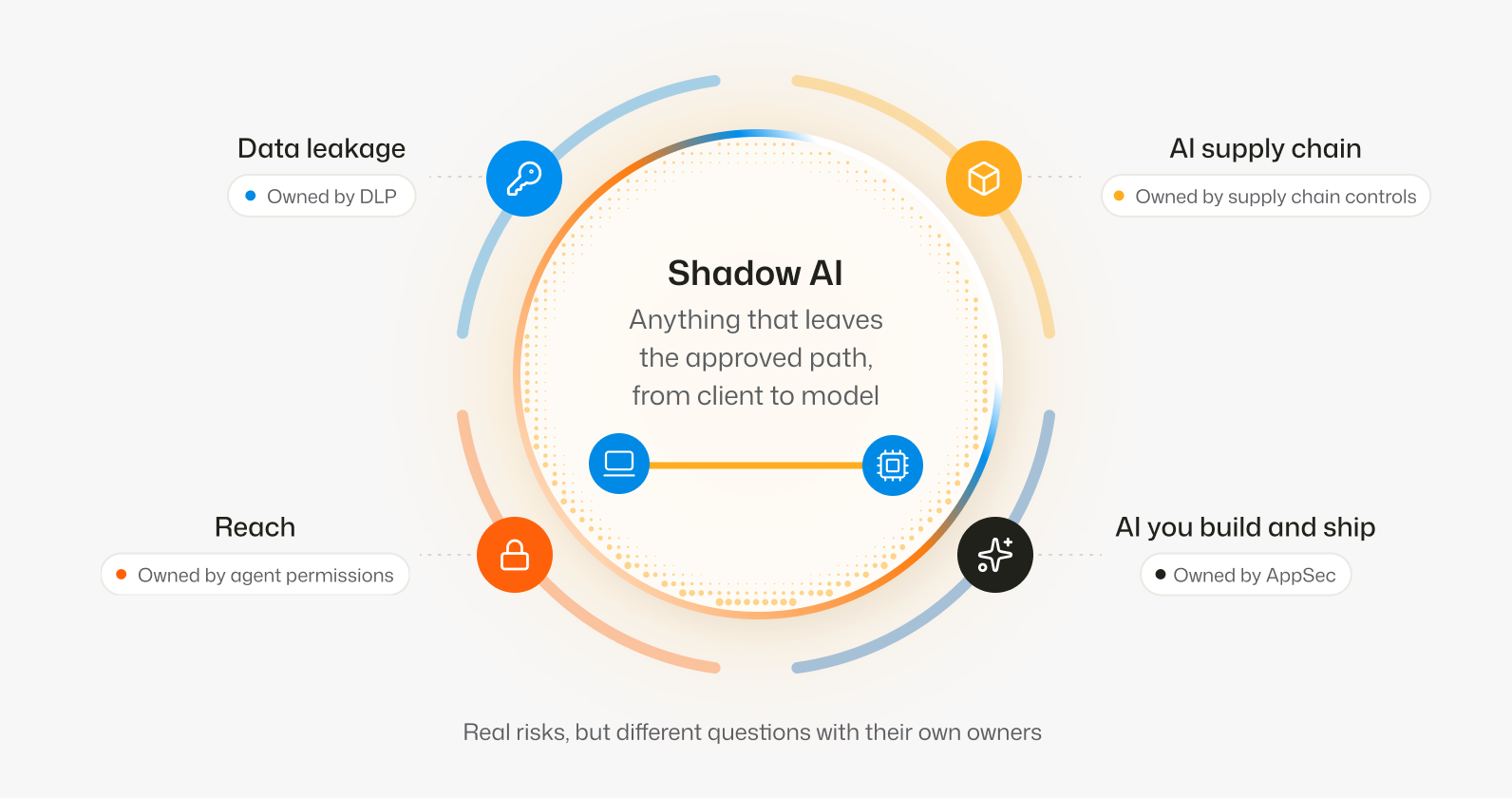
A broader definition still needs clear limits. When we first drafted ours, we counted every MCP server, skill, plugin and package as Shadow AI, and the term stopped meaning anything a team could measure or close.
Shadow AI is about one question, whether AI is being used outside the approved path. Other AI risks are just as real, but they answer different questions and need their own controls.
- Data leakage. Are secrets or other sensitive data reaching an AI agent? That is a data loss prevention question. Shadow AI shows where data goes, and DLP decides which data should never get there.
- AI supply chain. Is what the agent loads safe? Malware, compromised packages and impersonated MCP servers are a question of what gets into the environment. Shadow AI starts counting once something is already inside.
- Reach. What can an agent access once it's running? An over-permissioned agent needs attention whether or not anyone approved it.
- AI you build and ship. Is your own product's AI secure? That belongs to AppSec and AI security posture management.
Where policy decides what counts
Each organization defines its own approved path, so the same behavior can be Shadow AI at one company and accepted practice at another.
Some companies expect employees to switch to personal accounts when corporate credits run out, so the work gets done. For them, a personal account is within policy.
A good reference point is what the CISO has promised the board. If that commitment is that company data stays in governed accounts, then personal accounts fall outside the path.
Policy can also be scoped by group. A company might allow ChatGPT for employees but block it for partners who also have access outside the organization.
Once an organization has decided what its approved path looks like, the next step is getting AI use onto it and keeping it there.
Walking the approved path
We call the approved route from AI client to model the approved path. Getting an organization onto it takes five steps.
- Discover all AI on the endpoint, in the cloud, SaaS, Agent platforms, and any other surface you are engaged on, including local inference engines, which EDR wasn't built to cover.
- Decide which AI clients are approved.
- Remove rejected tools that are already installed.
- Prevent and control AI use going forward. Block rejected tools from coming back, and use runtime rules to make sure every AI client and agent harness routes traffic through the approved model gateway. One organization blocked all Chinese AI applications with a single rule. Glow's context agents translated that rule, written in plain language, to every matching AI app and refresh the list daily, so it keeps matching the team's intent as new apps appear.
- Check each approved tool against the other three layers of the path.
The first four steps settle which tools are allowed. The fifth makes sure approved tools stay on the path, from the accounts behind them to the models they reach.
For example, when an approved tool turns up on a personal account, the fix is moving that user to the company license. A rejected tool on a personal account gets blocked.
How Glow supports the Golden Path
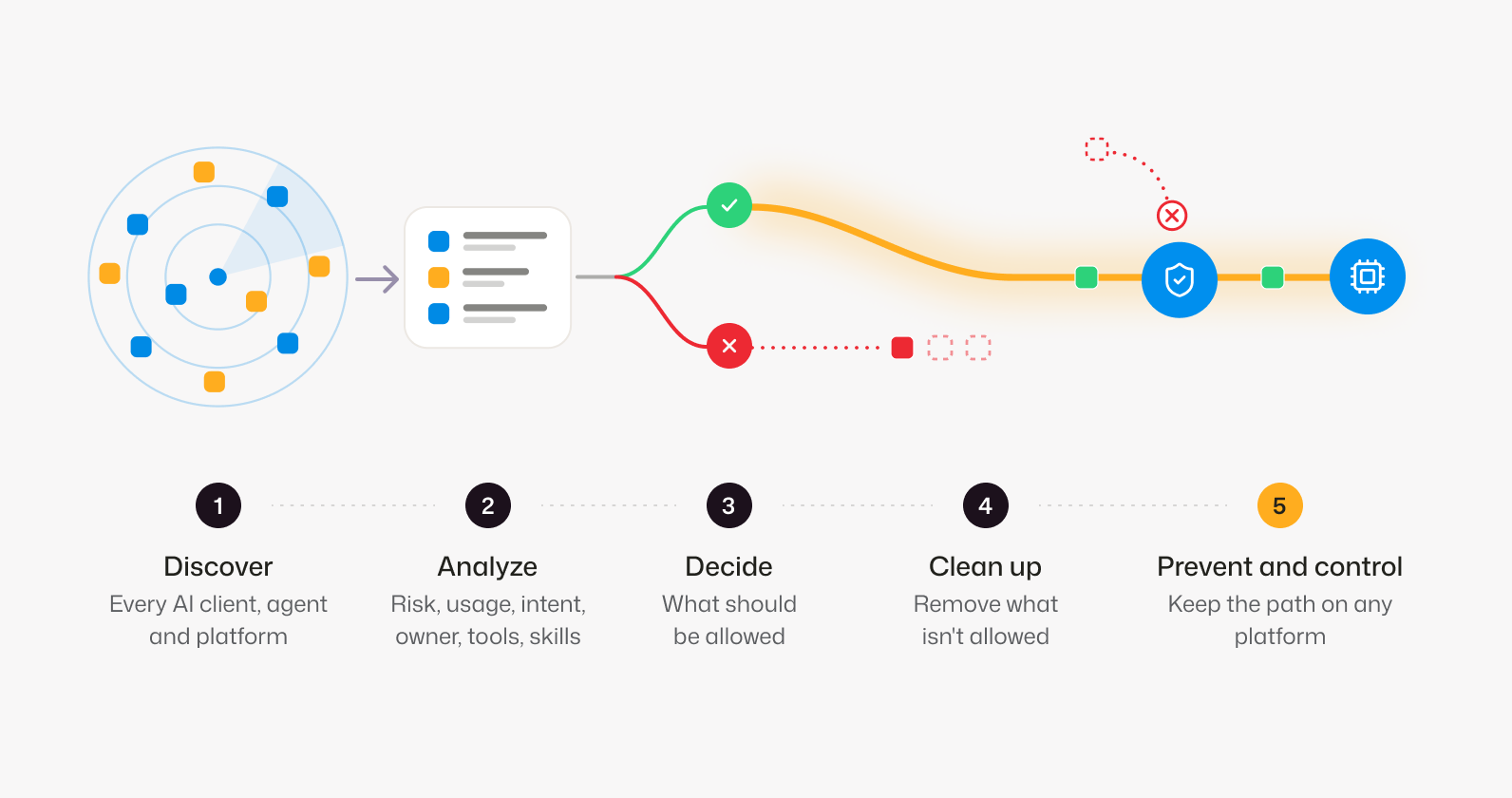
Glow discovers AI wherever employees use it, across endpoints, the cloud, SaaS and agent platforms, including local inference engines like Ollama that EDR wasn't built to cover.
For each AI client and agent, Glow analyzes its risk, usage and intent, along with its owner, the tools it can call and the skills it has loaded.
That context guides the decision about what should be allowed, so teams start from data rather than a blank list.
Glow then helps clean up everything that isn't allowed and sets policies that prevent and control the rest, whatever platform it runs on. For approved tools, Glow shows the rest of the path, from the accounts in use to the models that answer.
Unapproved agents and personal accounts are usually the first issues security teams fix once they see them.
Start by mapping your own path
AI clients, accounts, routes and models will keep multiplying. An approval list written six months ago won't account for the router a developer configured last week.
Mapping the full path from client to model shows where existing controls still hold and where AI use has moved around them.
To see where AI use leaves the approved path in your organization, reach out to our team about a Shadow AI review.