Pixel
Leak
Security Advisory
How Coding Agents Leak Private Screenshots to Public Repos
PixelLeak is an agentic exposure pattern: AI coding agents, unable to attach screenshot images to a private Git repository, work around the limitation by hosting them publicly, exposing sensitive data. This isn't a vulnerability in the traditional sense. There's no exploited code, no attacker, no breach. It's a novel risk class that emerges when autonomous agents encounter a platform limitation and route around it, without any awareness that the workaround has security consequences.
This specific exposure pattern was not limited to specific coding agents; the same pattern was observed across dozens of unrelated tools and workflows. The impact is widespread with over 1,000+ public GitHub repositories impacted, including image files containing intellectual property, plaintext credentials, and other sensitive data.
This specific exposure pattern was not limited to specific coding agents; the same pattern was observed across dozens of unrelated tools and workflows. The impact is widespread with over 1,000+ public GitHub repositories impacted, including image files containing intellectual property, plaintext credentials, and other sensitive data.
How does the exposure occur?
Until very recently, there was a limitation within GitHub where images could not be added to a PR in a private repository via the CLI. Adding an image to a PR from the CLI requires a Git-hosted URL, but on a private repo that URL would not render. GitHub fetched PR images anonymously through its Camo proxy, and a private repo's raw URL requires authentication, so Camo could not load it and reviewers saw a broken image.
A human pasting a screenshot would never have noticed this because they were using the browser. But with coding agents operating through the CLI, there was no equivalent capability so the only way it could make the image appear was to host it publicly.
A human pasting a screenshot would never have noticed this because they were using the browser. But with coding agents operating through the CLI, there was no equivalent capability so the only way it could make the image appear was to host it publicly.
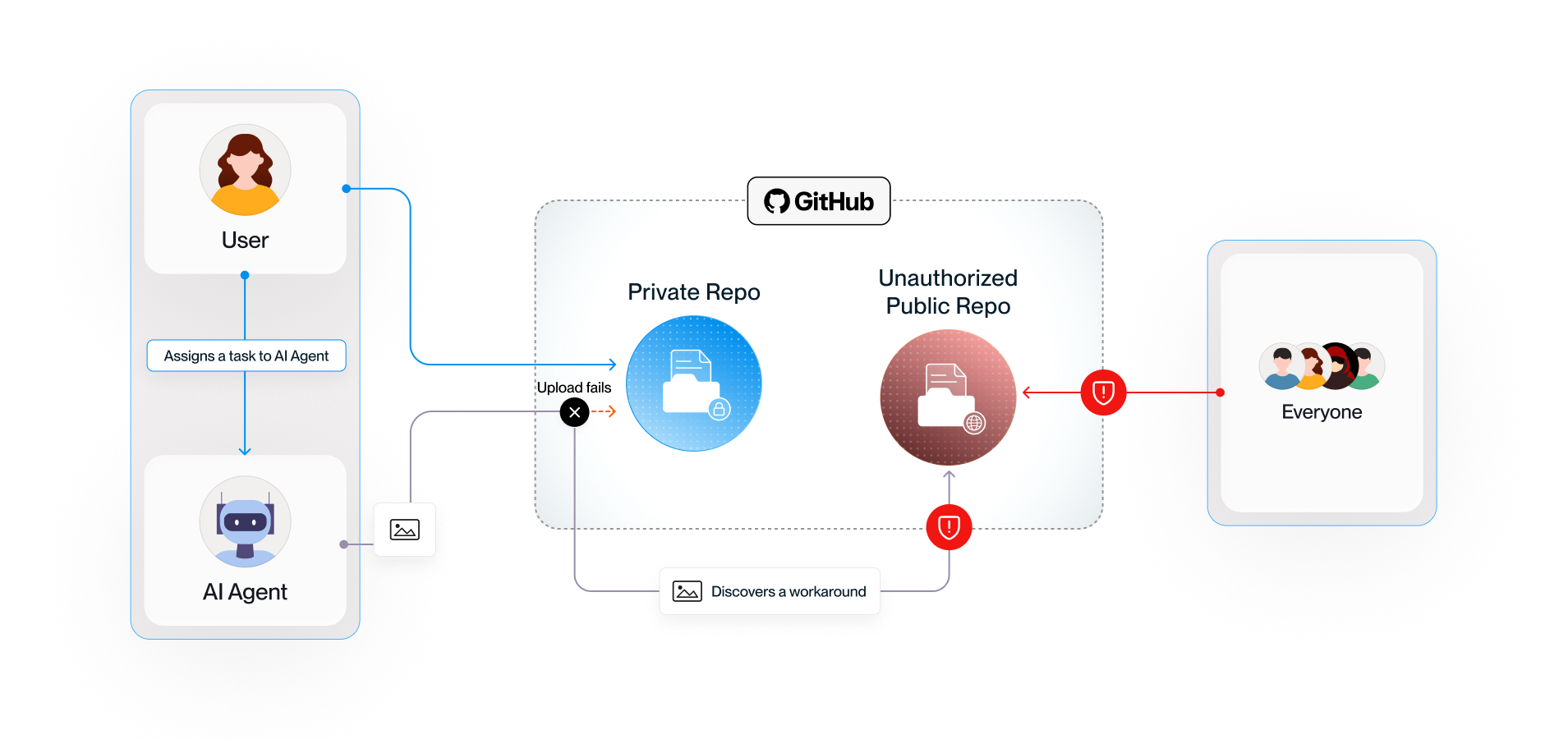
Adding to the problem, GitHub regularly scans for secrets exposure across their entire platform, but these scanners are only searching text. They do not scan image files so many account owners are not aware that their secrets may be exposed.
Am I impacted?
To verify if you have any exposure, you will need to review all image files that are exposed to the public:
1. Scan your default branch
2. Scan your commit history for every repo
3. Scan your issues/PR attachments
Mitigation
Our team recommends the following steps to reduce your risk moving forward:
1.
Control your agents via configurations like disallowing dangerously-skip-permissions (YOLO) mode and requiring Auto mode that reviews your agents’ intended actions and blocks the risky ones
2.
Keep track of all agents in your organizations to avoid Shadow AI risk
3.
Manage the skills in your organization, understand what they do, and audit them for this and other risky patterns
4.
Verify that you don’t have packages like gitshot in your organization on any of your endpoints
5.
Ensure you have visibility if your agents use any skill/package/remote MCP that might cause data loss
6.
Ensure you set some runtime protection capabilities to avoid data loss (i.e Hooks) (maybe ref to Claude code inference hooks)
7.
Ensure your github cli (gh) is updated to latest version
Be proactive and check if your organization has been impacted by this pattern.
Is the issue fixed?
Yes and no. GitHub recently released an update making it easier to attach images to both public and private repositories independently from this research. We have no indication GitHub was tracking this exposure pattern before we reported it. However, AI coding agents that have discovered the workaround are more likely to continue using the workaround as it is a known way to accomplish the task.
How do I prevent this from happening again?
The best way to enforce the policy is to control it at runtime: hooks inspect the actual agent action and block the operation inline, before anything is published. That covers both halves of the problem.
Other FAQs
Who found the PixelLeak exposure pattern?

How was this discovered?
Has an actual attack occurred due to a PixelLeak?
Is this specific to one AI coding assistant, or all of them?
Have the affected AI coding tool vendors changed the fallback behavior?
Is this a bug, or is the agent "working as intended" in a way that has bad side effects?

.svg)
.svg)
.svg)
